Installation
The carbon-txt validator project uses the Pyproject format to track software library dependencies, so should work with most python tools for managing dependencies, like pip or uv.
Optional dependency extras
The validator is split into optional extras so you only install what you need:
Install target |
What is included |
Use case |
|---|---|---|
|
Core library, CLI, and AI model card plugin (~15.6 MB) |
Validating files, building tools |
|
Core + Arelle for XBRL/CSRD parsing (~107 MB) |
Processing CSRD sustainability reports |
|
Core + misteltoe / frontmatter for YAML parsing (~6.4 MB) |
Processing AI model cards |
|
Core + Django + Granian web server (~152 MB) |
Running the validation API |
|
Everything above |
Development or full deployments |
Installing with pip
# Core only — CLI validation tool
python -m pip install carbon-txt

# With web server support
python -m pip install "carbon-txt[web]"

# With CSRD report processing
python -m pip install "carbon-txt[csrd]"

# With AI model card processing
python -m pip install "carbon-txt[ai_model_cards]"

# Everything
python -m pip install "carbon-txt[all]"
Installing with uv
uv is the recommended tool for managing dependencies, and the one we actively support.
Add carbon-txt to a project:
# Core only
uv add carbon-txt

# With web server support
uv add "carbon-txt[web]"

# With CSRD report processing
uv add "carbon-txt[csrd]"

# With AI model card processing
uv add "carbon-txt[ai_model_cards]"

# Everything
uv add "carbon-txt[all]"
Run without adding to a project:
# Core commands: validate, schema, plugins
uv tool run carbon-txt validate ./path/to/file

# Serve (requires the [web] extra)
uv tool run --with "carbon-txt[web]" carbon-txt serve
The supported approach for development - using uv and just
The supported, ‘golden path’ for development is to use uv for managing dependencies, and just for automating common tasks.
With that in mind, the supported, ‘golden path’ approach is to use the uv tool from Astral for managing dependencies, and just for automating common tasks.
We recommend and support uv, because it helps address many of the common issues managing different versions of Python, both in developmnent and in production, and is actively supported by people working on it full time.
We recommend just, as it offers a maintainable way to document and automate common tasks during development, and is both well documented, and actively maintained.
Installing just and installing uv
You can install uv with a single one-line command on most systems:
curl -LsSf https://astral.sh/uv/install.sh | sh
There are other supported ways to install uv documented on Astral’s installtion page for the project.
You can also install just with a similar one-liner.
curl --proto '=https' --tlsv1.2 -sSf https://just.systems/install.sh | bash -s -- --to DEST
However, depending on your system, there may be an option that integrates just better with your setup - please see the installation docs for more.
Developing with just
Once just and uv are set up, run just to see a list of tasks available for development:
just
You should see a list of tasks like this:
just --list
Available recipes:
    build               # clear the dist directory, and build the project, ready for publishing
    ci *options         # run the tests for a CI environment, generating a coverage report
    default             # list all the available commands
    docs *options       # generate docs into the docs/_build/html directory
    docs-watch *options # generate docs, serve the locally over http, and update them when files change
    env                 # show the environment variables available
    publish *options    # publish the built python project to pypi
    run-cli *options    # invoke the cli, as if you were running `carbon-txt` after downloading the package
    serve *options      # serve the django app, using the django manage.py script
    test *options       # run all the tests, with the ability to pass in options
    test-watch *options # run all the tests, and re-run them when files change
You can then run just test to run the tests, or to simulate running the CLI app, just run-cli.
This will also default to running each taks with any environment variables defined in .env available. you can override this by passing in a path to a custom environment file if need be:
just --dotenv-path ./path/to/custom.env YOUR_CHOSEN_TASK
Running tests
Run just test for a one off invocation of pytest.
Run just test-watch to run pytest every time files are updated.
By default, running this will also generate a test coverage report, that can be picked up by your editor to display code that still needs test coverage (see an example for VS code)
Testing out the API with Bruno, a graphical API testing tool
If you want to test responses from the API, the automated tests written in Python in this project exercise most of, if not all of the API endpoints.
If you prefer a GUI based API tester though, we have a set of tests for use with Bruno - an open source Postman-like API testing tool.
The API tests are tests/bruno-tests. From File > Open Collection: then choose the bruno-tests directory. You should see a list of tests like so:
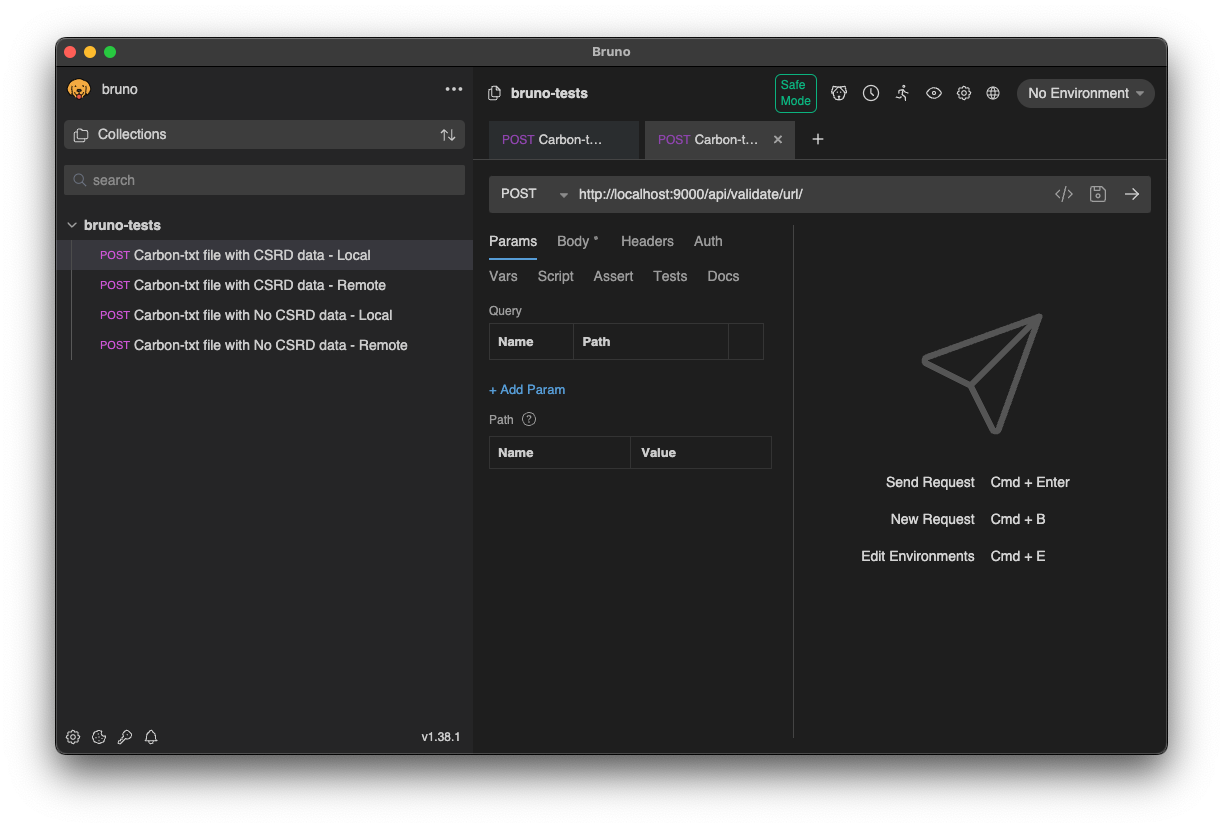
You can then open a test and trigger the API test with cmd + Enter